Quantum Cryogenics Tools
Quantum cryogenics becomes easier to understand when you know which question you are trying to answer. This page points you to the QCRY calculators, diagrams, and reference pages that match that question.
Use this page as a launchpad. Pick the tool that matches the question in front of you, then open the dedicated tool page for the calculator or visual explanation.
Choose a tool
| Tool | Use it when you want to | Best next step |
|---|---|---|
| Cryogenic Temperature Converter | Convert Kelvin, millikelvin, Celsius, and Fahrenheit while seeing where common cryogenic reference points sit. | Open the converter, then compare 300 K, 77 K, 4 K, 100 mK, and 10 mK on the same mental scale. |
| Cryogenic Thermal Budget Calculator | See how cables and active components can consume cooling margin at different stages. | Open the calculator, adjust line count and active load, then read the thermal budgeting guide. |
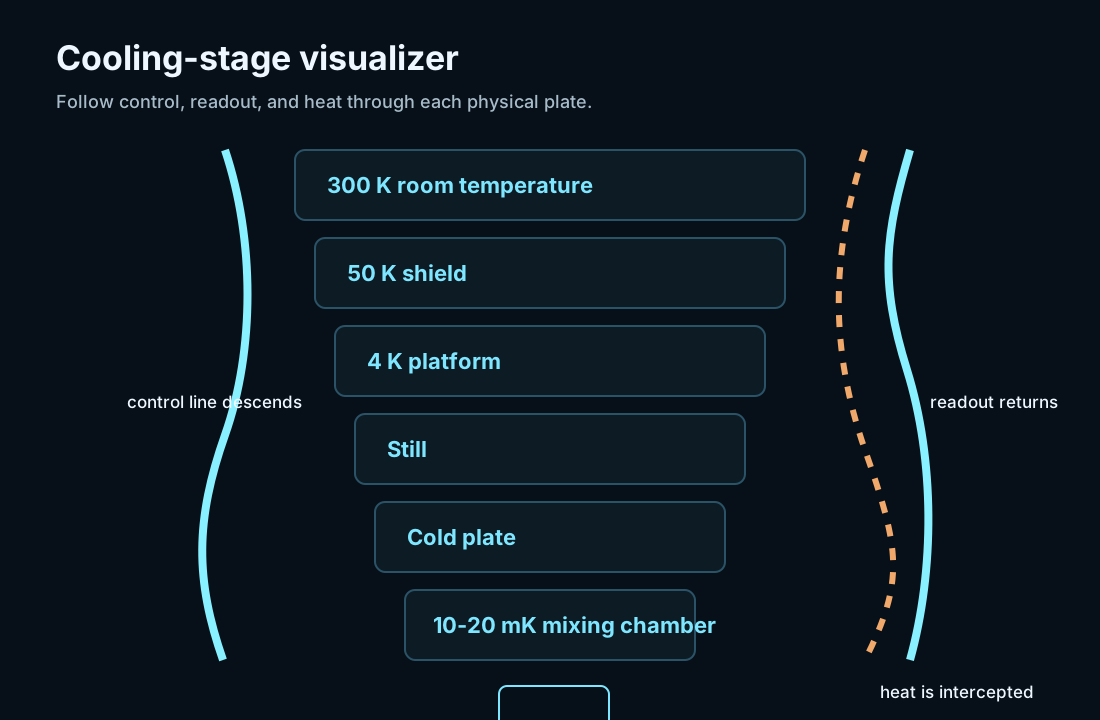
| Cooling-Stage Visualizer | Understand the vertical structure of a dilution refrigerator and where heat, control, and readout paths move. | Follow the map into the cooling stack guide. |
If you are new to cryogenics
Start with the temperature converter. The strange part of cryogenics is not just that the numbers are small. It is that common intuition breaks down. Room temperature is about 300 K. Liquid nitrogen is about 77 K. Liquid helium is near 4 K. Many superconducting qubit systems operate in the tens of millikelvin, which is another huge step colder.
Once those landmarks make sense, open the cooling-stage visualizer. It shows why a dilution refrigerator is organized in stages instead of one cold chamber. Each stage has different cooling power, different responsibilities, and different consequences for wiring and components.
If you are comparing systems
Use the tools to ask sharper questions before reading supplier pages:
- Is a quoted base temperature for an empty system or a loaded system?
- Which stage receives heat from cables, attenuators, filters, amplifiers, or electronics?
- Does the wiring plan make sense for the number of control and readout channels?
- Are thermal anchors and filters described as part of the installed system?
- Does a claim about scaling include cooling power, line density, readout, serviceability, and cooldown workflow?
The tools will not tell you whether a specific system is good. They help you notice which assumptions matter.
If you are building intuition for thermal budgets
Cold systems fail by details. A single cable may not sound important. A full set of control, readout, flux, pump, sensor, and heater lines can become a real thermal problem.
The thermal budget calculator gives a simplified view of that tradeoff. It is useful for understanding why stage-by-stage thinking matters:
- The 50 K and 4 K stages usually have more cooling power than the millikelvin region.
- Dissipation that is harmless at one stage can be expensive at another.
- Attenuators and filters reduce noise, but they also spend thermal budget.
- Cryogenic electronics can reduce cable count, but they add active heat.
- A design that reaches base temperature when empty may behave differently after wiring and hardware are installed.
What the tools are not
These tools are educational. They do not replace vendor specifications, lab measurements, safety review, mechanical design, RF simulation, or a formal heat-load model.
Treat each result from a dedicated tool page as a way to improve your questions. If a calculation or diagram makes one assumption look important, that is a signal to look for measured data, supplier documentation, or a more detailed model.
Common workflows
| Reader goal | Suggested path |
|---|---|
| Understand the cold stack quickly | Temperature converter, cooling-stage visualizer, cooling-stack guide. |
| Prepare for a supplier conversation | Cooling-stage visualizer, thermal budget calculator, supplier directory, benchmarks. |
| Learn why qubits need millikelvin temperatures | Temperature converter, superconducting qubits and temperature guide, dilution refrigerator guide. |
| Compare component categories | Cooling-stage visualizer, components hub, cryogenic wiring guide, RF chain guide. |
| Explain the topic to a non-specialist | Temperature converter, what is quantum cryogenics, cooling-stage visualizer. |
What the diagram shows
Open the tools
- Cryogenic Temperature Converter
- Cryogenic Thermal Budget Calculator
- Cooling-Stage Visualizer
- Quantum Cryogenics Components
- Quantum Cryogenics Benchmarks
Research sources
- NIST cryocoolers: https://trc.nist.gov/cryogenics/cryocoolers.html
- Bluefors systems: https://bluefors.com/products/dilution-refrigerator-measurement-systems/
- Lake Shore sensors: https://www.lakeshore.com/products/categories/overview/temperature-products/cryogenic-temperature-sensors/cernox